Custom Rails Generators: A Practical Guide
Build custom Rails generators with templates, arguments, options, and tests to automate boilerplate and enforce conventions.
By Jean Emmanuel Cadet • 22 min read
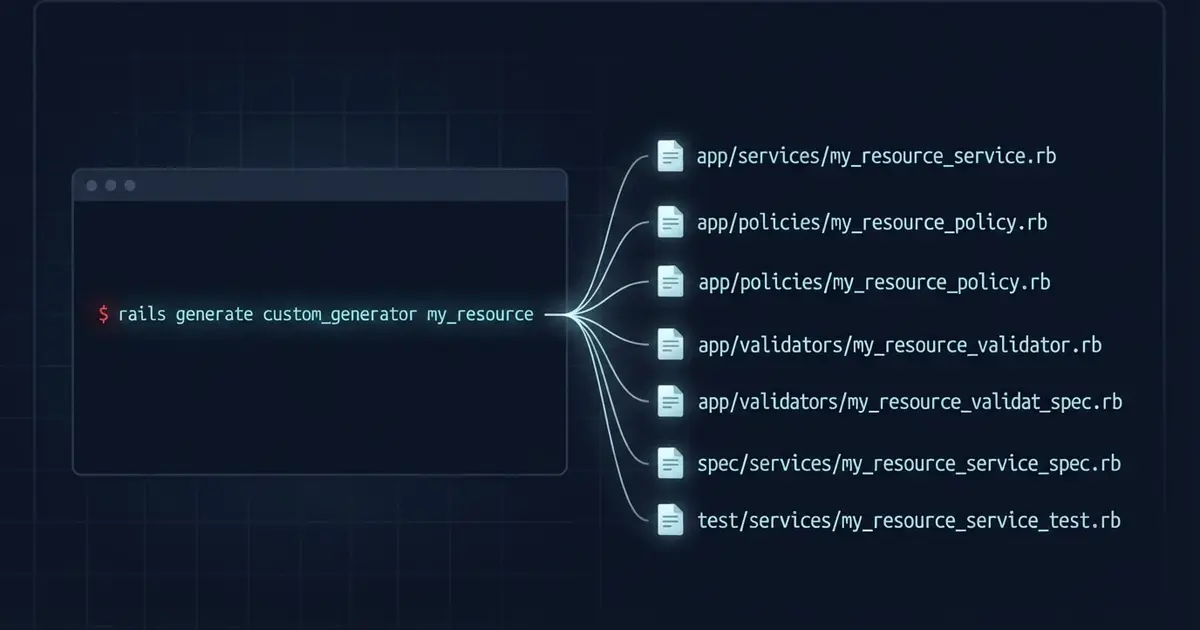
Every Rails developer remembers the first time they typed bin/rails generate model and watched a migration, a model, and a test appear in a second. Generators take care of the tedious part of starting a feature, so you can spend your energy on the logic that matters.
The built-in generators only know the conventions that Rails ships with. They cannot know that your team keeps service objects in app/services, that every policy needs a matching test, or that new Stimulus controllers should start with the same header comment. Those conventions usually live in someone’s head, a wiki page, or the last file a teammate copied and pasted. That is exactly where custom Rails generators help.
A custom generator is a small Ruby class plus a few templates. You run it with bin/rails generate, and it creates files with the right names, in the right folders, with the right boilerplate. The payoff is developer productivity, consistency, and maintainability. Generators do not make your application run faster at runtime. They make the code you write faster to start and more uniform across a team.
In this guide you will learn how the generator system works, build your first generator, add arguments and options, test your work, and finish with a practical service object generator. All examples target Rails 8.1.
What Are Rails Generators?
A Rails generator is a command line tool that creates files from templates and, sometimes, edits files that already exist. You run generators with bin/rails generate (or the shorter bin/rails g), and Rails uses them everywhere. Even rails new is a generator that builds a whole application.
Boilerplate is code that looks almost the same every time you write it: the class declaration, the file location, the standard method signatures. Generators produce that boilerplate for you in three ways:
- They create files, such as a model, a controller, or a test.
- They create directories, such as
app/views/articles. - They modify existing files, for example by adding a
resources :articlesline toconfig/routes.rb.
Because generators follow conventions, the output is predictable. If you ask for a model called Article, Rails knows the file belongs at app/models/article.rb and the class is named Article. A generator is really a repeatable recipe that turns a few inputs into a set of files.
Built-in Rails Generators
Before writing your own, it helps to know what Rails already gives you. Here are the four you will use most:
bin/rails generate model Article title:string body:text published:boolean
bin/rails generate controller Articles index show
bin/rails generate migration AddSlugToArticles slug:string:uniq
bin/rails generate scaffold Comment article:references body:text
The model generator creates the model class, a migration for its table, and a test file. The controller generator creates the controller, a view folder with a template for each action, a helper, a test, and routes for the actions you listed. The migration generator reads the migration name and attributes to build the right change. AddSlugToArticles slug:string:uniq produces a migration that adds the column and a unique index. The scaffold generator combines all of these into a complete resource: model, migration, controller, views, tests, and a resources route.
In everyday work these generators fit together naturally. You might scaffold a quick prototype, or generate a model and migration first and then a controller once the data design settles. If you change your mind, bin/rails destroy reverses a generator and removes the files it created. Rails 8 also ships an authentication generator, and bin/rails generate --help lists everything available in your application.
Notice the pattern: each generator takes a name plus attributes or actions, and produces files that follow Rails conventions. Custom generators follow the same pattern, but for your conventions.
Why Create Custom Rails Generators?
If you copy an existing file, rename it, and delete half of it to start a new feature, you have found a candidate for a generator. Common use cases include:
- Consistent service objects. Every service gets the same entry point, the same file location, and a matching test. If you want a refresher on the pattern itself, read our guide to Ruby on Rails service objects.
- Standard controller and view structures. A generator can create a controller, its views, and a shared partial that follows your team’s layout rules.
- Reusable components. A partial, a stylesheet, and a Stimulus controller can be created together so a component never ships half-finished.
- Policy and authorization files. Each policy class starts with the same constructor and the same predicate methods.
- Project-specific boilerplate. Form objects, custom validators, and query objects all have a recognizable shape that a template can capture.
- Team conventions. A generator is executable documentation. New teammates learn “this is how we write a validator” by running one command.
- Less repetitive work. Fewer manual steps means fewer typos, forgotten tests, and misplaced files.
There is a balance here. A generator is worth writing when you repeat a pattern often enough that the setup cost pays off, and when the pattern is stable. If a convention changes every month, a generator will mostly create maintenance work.
How Rails Generators Work
Generators Are Thor Classes
Rails generators are built on Thor, a Ruby library for command line tools. A generator class inherits from Rails::Generators::Base, which is built on Thor::Group. The important rule: every public instance method you define runs automatically, in the order you define it. Each method is one step of the generator. Private methods do not run, so you use them for helpers.
Rails offers two base classes:
Rails::Generators::Basefor generators that need no name, such as a setup generator.Rails::Generators::NamedBasefor generators that take a name, such asbin/rails generate policy Post. It adds a requirednameargument plus naming helpers likeclass_nameandfile_name.
Source Roots, Templates, and Actions
Templates live in a folder called the source root. You declare it with source_root, and Thor looks there whenever you reference a template by name. Inside your steps, you call actions such as template, copy_file, create_file, directory, and empty_directory. Thor provides the file actions, and Rails adds helpers for things like routes and initializers.
Templates are ERB files, conventionally ending in .tt. They are rendered in the context of the generator instance, which is how a template reads values like class_name or options.
How Rails Finds Your Generator
When you run bin/rails generate policy, Rails turns the generator name into file paths and requires the first one it finds on the load path:
rails/generators/policy/policy_generator.rb
generators/policy/policy_generator.rb
rails/generators/policy_generator.rb
generators/policy_generator.rb
In an application, lib is on the load path, so lib/generators/policy/policy_generator.rb is found. Gems work the same way through their own lib directory.
Integration With Rails Commands
bin/rails generate and bin/rails destroy both run your generator. Rails adds standard flags to every generator: --pretend (show what would happen without writing anything), --force (overwrite conflicting files), --skip (skip conflicting files), and --quiet. Because destroy can reverse the common file actions, you get an undo command for free.
Creating Your First Custom Generator
Let us build a generator that creates plain Ruby policy classes. Rails has a generator that generates generators, so start there:
bin/rails generate generator policy
This creates a generator class, a USAGE help file, and a templates folder. Depending on your test setup, it may also create a test file.
lib/
└── generators/
    └── policy/
        ├── USAGE
        ├── policy_generator.rb
        └── templates/
The generator class is where the work happens. Replace its contents with this:
# lib/generators/policy/policy_generator.rb
class PolicyGenerator < Rails::Generators::NamedBase
  source_root File.expand_path("templates", __dir__)

  def create_policy
    template "policy.rb.tt", File.join("app/policies", class_path, "#{file_name}_policy.rb")
  end
end
Three things are worth noticing. The class name ends in Generator, which is how Rails derives the namespace policy. source_root points at the sibling templates folder. And create_policy is a public method, so it runs as a step. It renders a template into app/policies.
Now create the template:
<%# lib/generators/policy/templates/policy.rb.tt %>
class <%= class_name %>Policy
  attr_reader :user, :record

  def initialize(user, record)
    @user = user
    @record = record
  end

  def show?
    false
  end
end
Defaulting show? to false is a deliberate choice: new policies deny access until someone writes a rule. Fill in the help text so --help is useful:
# lib/generators/policy/USAGE
Description:
    Generates a plain Ruby policy class in app/policies.

Example:
    bin/rails generate policy Post

    This creates:
        app/policies/post_policy.rb
Run it:
bin/rails generate policy Post
create app/policies/post_policy.rb
Try bin/rails generate policy Admin::Post and the file lands in app/policies/admin/post_policy.rb with the class Admin::PostPolicy. Because the generator uses NamedBase, nested names work without extra code.
Understanding Generator Files and Templates
A generator has three moving parts: the generator class, the templates, and the source root that connects them. The class decides what happens and in what order. Templates hold the content. The source root tells Thor where to find that content.
Thor gives you several actions for creating files. This setup generator uses all five of the ones you will reach for most often:
# lib/generators/conventions/conventions_generator.rb
class ConventionsGenerator < Rails::Generators::Base
  source_root File.expand_path("templates", __dir__)

  def create_folders
    empty_directory "app/services"
    empty_directory "app/policies"
  end

  def create_base_service
    create_file "app/services/application_service.rb", <<~RUBY
      class ApplicationService
        def self.call(...)
          new(...).call
        end
      end
    RUBY
  end

  def copy_editor_config
    copy_file "editorconfig", ".editorconfig"
  end

  def copy_docs
    directory "docs", "docs/conventions"
  end
end
Here is what each action does:
Action | What it does |
|---|---|
| Creates a directory if it does not exist. |
| Creates a file from a string you provide, with no template file. |
| Copies a file from the source root exactly as it is, with no ERB processing. |
| Copies a file from the source root after rendering it as ERB. |
| Copies a whole folder tree. Files ending in |
This generator inherits from Rails::Generators::Base because it needs no name. You would run it with bin/rails generate conventions. The matching templates folder looks like this:
lib/generators/conventions/templates/
├── editorconfig
└── docs/
    ├── README.md.tt
    └── naming.md
The .tt extension is a convention that signals “this file is rendered before it is copied.” In the example above, README.md.tt becomes README.md, and naming.md is copied as-is.
How Template Variables Reach the File
Thor’s template action has no locals: option like a Rails view. Instead, ERB runs in the context of the generator instance. That means templates can read anything the generator can: public and private methods (class_name, options), and instance variables you set in a step. If a generator sets @owner = "Platform Team", the template can print it with <%= @owner %>. Keep this in mind, because it explains most “where does that value come from?” questions.
Thor renders templates with ERB’s - trim mode, so <% ... -%> removes the newline after a tag. This keeps loops and conditionals from leaving blank lines in the output.
One more gotcha: if the file you are generating is itself an ERB file (a view, for example), its tags would be evaluated while the generator renders it. Write <%%= value %> in the template to produce a literal <%= value %>. Or use copy_file for files that contain no generator values.
Using Generator Arguments and Options
Generators accept two kinds of input, and the difference matters:
- Arguments are positional. You type them in a fixed order after the generator name, and they are usually required.
Postinbin/rails generate policy Postis an argument. - Options are named switches that start with
--, such as--skip-tests. They are optional and have defaults.
Use arguments for what the generator cannot work without (a name, a list of fields) and options for variations of the output.
Let us extend the policy generator with an option for which actions to define:
# lib/generators/policy/policy_generator.rb
class PolicyGenerator < Rails::Generators::NamedBase
  source_root File.expand_path("templates", __dir__)

  class_option :actions, type: :array,
                         default: %w[index show create update destroy],
                         desc: "Actions to define as predicate methods"

  def create_policy
    template "policy.rb.tt", File.join("app/policies", class_path, "#{file_name}_policy.rb")
  end
end
class_option declares an option. It accepts a type (:string, :boolean, :numeric, :array, or :hash), a default, a desc shown in --help, and extras like aliases and enum. Inside the generator and its templates, read the value with options[:actions]. Update the template to loop over it:
class <%= class_name %>Policy
  attr_reader :user, :record

  def initialize(user, record)
    @user = user
    @record = record
  end
<% options[:actions].each do |action| -%>

  def <%= action %>?
    false
  end
<% end -%>
end
Now you can customize the output from the command line:
bin/rails generate policy Post --actions index show
Positional arguments beyond name use the argument method. For example, argument :fields, type: :array, default: [], banner: "name:type name:type" accepts any number of trailing values and shows a readable hint in --help. Argument types are :string, :numeric, :array, and :hash. An array argument consumes all remaining positional values, so it must be your last argument. Boolean options also get a negated form for free: with class_option :skip_tests, type: :boolean, users can pass --skip-tests.
Generating Dynamic Content
Templates become powerful once they use the values the user provided. NamedBase gives you a set of naming helpers. For the input admin/blog_post, you get:
Helper | Value |
|---|---|
|
|
|
|
|
|
|
|
|
|
|
|
Rails builds these with the same Active Support inflector used throughout your application. That is why BlogPost, blog_post, and Admin::BlogPost are all accepted. Two inflection details matter:
- Rails does not singularize or pluralize what you type.
class_namecamelizes your input as given, so useplural_nameorfile_name.pluralizewhen you need a plural. - Acronyms follow your inflection rules. If
config/initializers/inflections.rbdeclaresinflect.acronym "API", thenapi_clientbecomesAPIClient.
Here is a custom validator generator that uses these helpers. Rails does not generate validators out of the box, so this is a good candidate. For the concept behind the output, see our practical guide to Rails custom validators.
# lib/generators/validator/validator_generator.rb
class ValidatorGenerator < Rails::Generators::NamedBase
  source_root File.expand_path("templates", __dir__)

  def create_validator
    template "validator.rb.tt", File.join("app/validators", class_path, "#{file_name}_validator.rb")
  end
end
<%# lib/generators/validator/templates/validator.rb.tt %>
class <%= class_name %>Validator < ActiveModel::EachValidator
  def validate_each(record, attribute, value)
    return if value.blank?
    return if valid_<%= file_name %>?(value)

    record.errors.add(attribute, options[:message] || :invalid)
  end

  private

  def valid_<%= file_name %>?(value)
    # TODO: implement the rule for <%= human_name.downcase %> values
    true
  end
end
Running bin/rails generate validator phone_number creates PhoneNumberValidator, which you use as validates :phone, phone_number: true.
Now a form object generator that accepts a list of fields. If form objects are new to you, our article on when to use Rails form objects covers the idea. This generator parses name:type pairs into Active Model attributes:
# lib/generators/form_object/form_object_generator.rb
class FormObjectGenerator < Rails::Generators::NamedBase
  source_root File.expand_path("templates", __dir__)

  argument :fields, type: :array, default: [], banner: "name:type name:type"

  def create_form_object
    template "form_object.rb.tt", File.join("app/forms", class_path, "#{file_name}_form.rb")
  end

  private

  def parsed_fields
    fields.map do |field|
      field_name, type = field.split(":")
      [field_name, type || "string"]
    end
  end
end
<%# lib/generators/form_object/templates/form_object.rb.tt %>
class <%= class_name %>Form
  include ActiveModel::Model
  include ActiveModel::Attributes

<% parsed_fields.each do |field_name, type| -%>
  attribute :<%= field_name %>, :<%= type %>
<% end -%>

  def save
    return false unless valid?

    # Persist your records here
    true
  end
end
The command bin/rails generate form_object Signup email:string age:integer produces a SignupForm with two typed attributes in app/forms/signup_form.rb. The helper parsed_fields is private, so it does not run as a step, yet the template can still call it.
The same pattern covers front-end files. A Stimulus controller generator can compute the controller identifier from the file path. Stimulus turns admin/user_menu into admin--user-menu, which you can compute with file_path.dasherize.gsub("/", "--"). Rails already ships a stimulus generator through the stimulus-rails gem, so name yours something different (like stimulus_component) to avoid a clash.
Adding Generators to a Rails Application
Application-specific generators live in lib/generators. Each generator gets its own folder, and the folder name becomes the generator name:
my_app/
├── app/
├── lib/
│   ├── generators/
│   │   ├── policy/
│   │   │   ├── USAGE
│   │   │   ├── policy_generator.rb
│   │   │   └── templates/
│   │   │       └── policy.rb.tt
│   │   ├── service/
│   │   │   ├── USAGE
│   │   │   ├── service_generator.rb
│   │   │   └── templates/
│   │   │       ├── service.rb.tt
│   │   │       └── service_test.rb.tt
│   │   └── validator/
│   │       ├── validator_generator.rb
│   │       └── templates/
│   │           └── validator.rb.tt
│   └── templates/
└── test/
    └── lib/
        └── generators/
Rails discovers these files through the load path lookup described earlier, so there is no registration step. Run bin/rails generate --help and your generators appear in the list. Because every command starts a fresh process, you can edit a generator and run it again immediately.
One caution involves autoloading. Generators are loaded with require, not through constant lookup. If your application calls config.autoload_lib and bin/rails zeitwerk:check complains about files under lib/generators, tell Zeitwerk to skip that folder:
# config/application.rb
config.autoload_lib(ignore: %w[assets tasks generators])
If you want to understand why autoloaded folders have naming rules that generators do not follow, read our explanation of how Rails autoloading works with Zeitwerk.
Namespaced and Reusable Generators
Organizing With Namespaces
A namespace groups related generators and prevents name clashes. Wrap the class in a module and Rails builds the namespace from the module and class names:
# lib/generators/codecurious/service/service_generator.rb
module Codecurious
  class ServiceGenerator < Rails::Generators::NamedBase
    source_root File.expand_path("templates", __dir__)

    # ...
  end
end
You invoke it with a colon:
bin/rails generate codecurious:service Billing::ChargeCard
Rails turns codecurious:service into the path generators/codecurious/service/service_generator (and a flat generators/codecurious/service_generator variant), so the file location must match the namespace. A mismatch between the module name and the folder structure is the most common reason a namespaced generator is not found.
Application Generators vs. Generator Gems
An application-specific generator belongs to one codebase. It can hardcode your folders, base classes, and testing style, which keeps it simple. A reusable generator gem serves many projects, so it must avoid assumptions about any single app:
codecurious_generators/
├── codecurious_generators.gemspec
└── lib/
    └── generators/
        └── codecurious/
            └── service/
                ├── USAGE
                ├── service_generator.rb
                └── templates/
                    ├── service.rb.tt
                    └── service_test.rb.tt
# codecurious_generators.gemspec
Gem::Specification.new do |spec|
  spec.name = "codecurious_generators"
  spec.version = "0.1.0"
  spec.summary = "Opinionated generators for Rails applications"
  spec.authors = ["Your Name"]
  spec.files = Dir["lib/**/*"]
  spec.add_dependency "railties", ">= 7.1"
end
Two details matter for gems. First, spec.files must include the templates, or the generator will work locally and fail once packaged. Second, a gem should expose options for anything an app might want to change, such as destination folders. Add the gem to the development group in your Gemfile, and its generators appear in bin/rails generate --help just like local ones.
Customizing Existing Rails Generators
Sometimes you do not need a new generator. You only want the built-in ones to produce different output. Rails gives you two tools for this, and they solve different problems.
Overriding templates changes what an existing generator writes. Rails checks lib/templates in your application before it uses its own templates, so a file placed at the matching path wins:
lib/templates/
├── active_record/
│   └── model/
│       └── model.rb.tt
├── erb/
│   └── scaffold/
│       └── index.html.erb.tt
└── rails/
    └── scaffold_controller/
        └── controller.rb.tt
The easiest way to start is to copy the original template and edit it. Find the gem directory with bundle info activerecord --path (or railties for scaffold templates), locate the template under lib/rails/generators, and copy it into the matching lib/templates path. A typical change is adding a # frozen_string_literal: true comment to every generated model. Because the override replaces the whole template, you take on the job of keeping it in sync when Rails changes the original.
Configuring generators changes which generators Rails invokes and with what defaults. This lives in config/application.rb:
config.generators do |g|
  g.helper false
  g.test_framework :test_unit, fixture: false
  g.orm :active_record, primary_key_type: :uuid
end
The rule of thumb: override a template when the built-in generator is right but its output needs adjusting. Build a new generator when you need a different file set, new arguments, or something Rails never generated, like a service object.
Testing Custom Generators
Generators are code that writes code, so a small test suite protects you from breaking everyone’s workflow. Rails provides Rails::Generators::TestCase, built on Minitest. It runs your generator inside a temporary destination folder and gives you assertions for the results. Place tests in test/lib/generators:
# test/lib/generators/policy_generator_test.rb
require "test_helper"
require "rails/generators/test_case"
require "generators/policy/policy_generator"

class PolicyGeneratorTest < Rails::Generators::TestCase
  tests PolicyGenerator
  destination Rails.root.join("tmp/generators").to_s
  setup :prepare_destination

  test "creates a policy file" do
    run_generator %w[Post]

    assert_file "app/policies/post_policy.rb" do |content|
      assert_match(/class PostPolicy/, content)
      assert_match(/def show\?/, content)
    end
  end

  test "supports nested names" do
    run_generator %w[Admin::Post]

    assert_file "app/policies/admin/post_policy.rb", /class Admin::PostPolicy/
  end

  test "respects the actions option" do
    run_generator %w[Post --actions index]

    assert_file "app/policies/post_policy.rb" do |content|
      assert_match(/def index\?/, content)
      assert_no_match(/def destroy\?/, content)
    end
  end
end
Here is what each piece does. tests names the generator under test. destination sets the temporary folder, and prepare_destination empties it before each test. run_generator runs the generator with an array of arguments, exactly as you would type them in the terminal. assert_file checks that a file exists and, optionally, that its content matches patterns or satisfies a block. There is also assert_no_file for options that should skip a file. If your generator edits an existing file, such as routes, create that file in the destination during setup, since the folder starts empty.
Run these tests like any others:
bin/rails test test/lib/generators
Because Rails::Generators::TestCase is Minitest-based, RSpec projects can either keep generator tests in Minitest or use a community gem such as generator_spec.
Practical Real-World Example
Time to put everything together. This generator creates a service object and a matching test, accepts keyword inputs as positional arguments, lets the team choose the method name, and can skip the test file.
The Generator
# lib/generators/service/service_generator.rb
class ServiceGenerator < Rails::Generators::NamedBase
  source_root File.expand_path("templates", __dir__)

  argument :inputs, type: :array, default: [], banner: "input input"

  class_option :entrypoint, type: :string, default: "call", aliases: "-e",
                            desc: "Name of the public method"
  class_option :skip_tests, type: :boolean, default: false,
                            desc: "Skip the test file"

  def validate_inputs
    invalid = inputs.reject { |input| input.match?(/\A[a-z_][a-z0-9_]*\z/) }
    return if invalid.empty?

    raise Thor::Error, "Invalid input names: #{invalid.join(', ')}. " \
                       "Use snake_case names such as customer or amount_cents."
  end

  def create_service
    template "service.rb.tt", File.join("app/services", class_path, "#{file_name}.rb")
  end

  def create_service_test
    return if options[:skip_tests]

    template "service_test.rb.tt", File.join("test/services", class_path, "#{file_name}_test.rb")
  end

  private

  def entrypoint
    options[:entrypoint]
  end

  def keyword_arguments
    inputs.map { |input| "#{input}:" }.join(", ")
  end

  def attribute_readers
    inputs.map { |input| ":#{input}" }.join(", ")
  end
end
The first step validates the inputs before anything is written, so a typo cannot leave half-generated files behind. The helper methods are private so they act as template helpers and do not run as steps.
The Templates
<%# lib/generators/service/templates/service.rb.tt %>
class <%= class_name %>
  def self.<%= entrypoint %>(...)
    new(...).<%= entrypoint %>
  end

<% if inputs.any? -%>
  def initialize(<%= keyword_arguments %>)
<% inputs.each do |input| -%>
    @<%= input %> = <%= input %>
<% end -%>
  end

<% end -%>
  def <%= entrypoint %>
    # TODO: implement <%= class_name %>
  end
<% if inputs.any? -%>

  private

  attr_reader <%= attribute_readers %>
<% end -%>
end
<%# lib/generators/service/templates/service_test.rb.tt %>
require "test_helper"

class <%= class_name %>Test < ActiveSupport::TestCase
  test "responds to <%= entrypoint %>" do
    assert_respond_to <%= class_name %>, :<%= entrypoint %>
  end
end
Running It
bin/rails generate service Billing::ChargeCard customer amount_cents
      create  app/services/billing/charge_card.rb
      create  test/services/billing/charge_card_test.rb
The generated service looks like this:
# app/services/billing/charge_card.rb
class Billing::ChargeCard
  def self.call(...)
    new(...).call
  end

  def initialize(customer:, amount_cents:)
    @customer = customer
    @amount_cents = amount_cents
  end

  def call
    # TODO: implement Billing::ChargeCard
  end

  private

  attr_reader :customer, :amount_cents
end
Passing --entrypoint perform changes both the class method and the instance method to perform. Passing --skip-tests leaves out the test file.
Adapting It to Your Application
Treat this as a starting point and change the template, not the idea. If your team uses RSpec, point the test step at spec/services and render a spec template. If every service inherits from a base class, add < ApplicationService to the template. If you prefer nested modules over the compact Billing::ChargeCard style, loop over class_path in the template. For the design questions behind these choices, our service objects guide goes deeper.
Common Mistakes and Troubleshooting
The Generator Is Not Found
If bin/rails generate service says the generator does not exist, check the basics first. The file must be named *_generator.rb, the class name must end in Generator, and the file must sit in a path Rails searches, such as lib/generators/service/service_generator.rb. Also confirm you are running the command from the application root. For namespaced generators, make sure the module and folder names agree: Codecurious::ServiceGenerator is invoked as codecurious:service and lives under generators/codecurious/service/.
Template Path Errors
When Thor reports that it could not find a file in any of your source paths, there are three usual suspects. You forgot source_root. The File.expand_path("templates", __dir__) call points at the wrong folder. Or the template name in your step does not match the real file name, including the .tt extension. Run ls on the templates folder and compare it with the name in your generator.
Missing or Invalid Arguments
If you see a message that no value was provided for required arguments name, you ran a NamedBase generator without a name. Array options deserve extra care: an option like --actions index show takes every value up to the next switch, so it can swallow a name placed after it. Put the positional name first.
Naming Surprises
Generated class names come from the input, not from your intentions. api_client becomes ApiClient unless you declared an acronym inflection. class_name does not singularize, so Posts stays Posts. If a name looks wrong, print class_name, file_name, and class_path from a quick say call inside a step to see exactly what Rails computed.
Unexpected Generated Output
Blank lines in the wrong places usually mean a missing -%> on a loop or conditional tag. Literal <%= %> tags missing from a generated view mean you forgot to escape them as <%%=. A helper method that unexpectedly runs as a step means you defined it as public: move it below private, or wrap it in no_commands. Whenever you are unsure what a generator will do, run it with --pretend first, and use bin/rails destroy to clean up after an experiment.
Best Practices
Keep each generator focused. A generator that creates a service object should create a service object and its test, not also edit three configuration files. Small generators are easier to understand and to test.
Generate code your team would write by hand. Templates should produce clean, idiomatic output that follows your current conventions. Avoid placeholder comments that nobody will remove, and prefer a safe default (like a policy that returns false) over code that quietly does nothing useful.
Document every argument and option. Fill in USAGE and give every class_option a desc. The help output is how your teammates will discover what the generator can do.
Validate early. Check inputs in the first step so a bad argument cannot leave partial output on disk.
Test the output. Assert file paths, key lines of content, and the effect of each option. A short test file catches template regressions during Rails upgrades.
Avoid unnecessary abstractions. If you only create a certain kind of file twice a year, copy an old one. Resist adding options for hypothetical needs. Add an option when a second real use case appears.
Treat generators like production code. Review template changes in pull requests, and update templates when your conventions change so that new code never lags behind your standards.
Conclusion
Custom Rails generators turn your team’s conventions into a command anyone can run. They are most useful when you repeatedly create files with the same shape: service objects, policies, validators, form objects, Stimulus controllers, and reusable components. A generator is a Thor class, a source root, and some ERB templates, and Rails discovers it from lib/generators without any registration.
Start small. Build a generator for the file you create most often, give it a clear USAGE, and add a test. When the pattern changes, update the template once and every future file follows. The result is not faster runtime performance but something just as valuable: consistent code, less manual work, and a codebase where new files look like they belong.